10 common dispatch headaches for small taxi and transfer operators
If you run green-plate taxis, charters and tours, airport transfers or private hire in Japan, take bookings by phone and message, and dispatch from paper or Excel, these situations will sound familiar. For each one, here’s how HAICO deals with it. HAICO is a dispatch tool for operators, and it’s free to sign up.
- A customer is on the phone and you can’t say which vehicle is free
- Two jobs on the same vehicle, and nobody notices until the day
- A flight is delayed and the rest of the day has to be redone
- Drivers ask: “Which car tomorrow, what time, where?”
- A customer wants to check the itinerary, but should see nothing else
- A driver is off — who takes their jobs?
- A vehicle is in the shop, and a job gets booked on it anyway
- Some customers pay in yen, others in yuan, and month end is a mess
- Green-plate Shaken inspections and insurance renewals sneak up on you
- The accountant wants all the orders in one file
A customer is on the phone and you can’t say which vehicle is free
You flip through the sheet while the customer waits. The more vehicles you run, the easier it is to miss one.
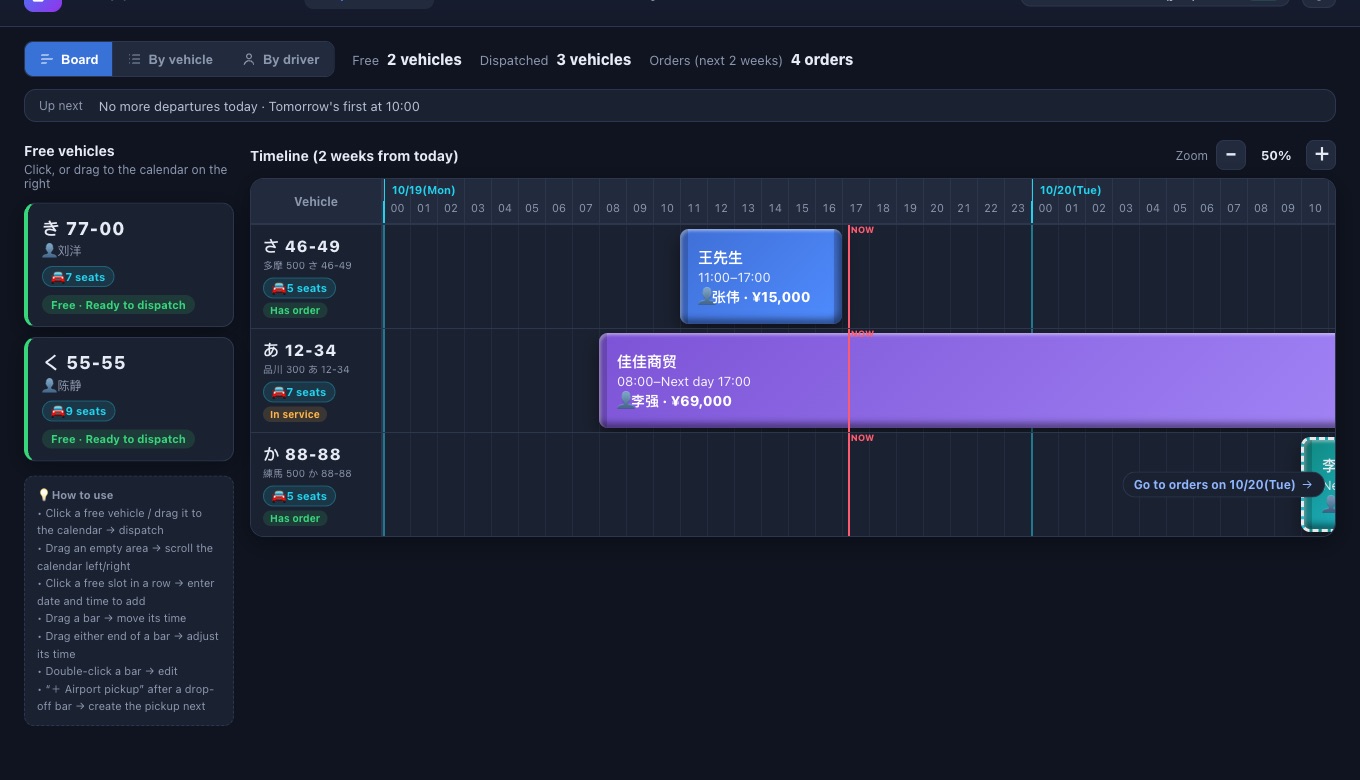
With HAICOThe left side of the “Dispatch board” lists vehicles with nothing booked in the next two weeks. When entering an order, open the “Vehicle” field to see which vehicles and drivers are free at that timePro.
Two jobs on the same vehicle, and nobody notices until the day
Excel won’t warn you about overlaps. Move one booking and it quietly collides with another.
With HAICOOverlapping jobs on the same vehicle won’t go in. Dragging a booking to a new time won’t let you drop it on a clash either.
A flight is delayed and the rest of the day has to be redone
One late arrival pushes back that job and the ones after it, and in Excel that means rewriting cell after cell.
With HAICODrag the bar on the board to push the whole job back, or drag either end to change the start or finish. Flight numbers are stored on the order, so you always know which flight each pickup or drop-off is for.
Drivers ask: “Which car tomorrow, what time, where?”
Every evening you message each driver their schedule, and sooner or later one gets missed or mistyped.
With HAICOSwitch the board to “By driver” to see each person’s day. Or send a driver link that an admin creates under “Team” → “External share links”: the itinerary, notes and flight number are all there, and customer names and fares are left outPro.
A customer wants to check the itinerary, but should see nothing else
Send a screenshot of the sheet and other customers’ names and fares go with it.
With HAICOA customer share link, created by an admin, shows only the orders you choose, with fares hidden automatically. Every link has an expiry date, and you can extend or revoke it laterPro.
A driver is off — who takes their jobs?
A last-minute day off means digging that driver’s jobs out of the sheet and reassigning them one by one.
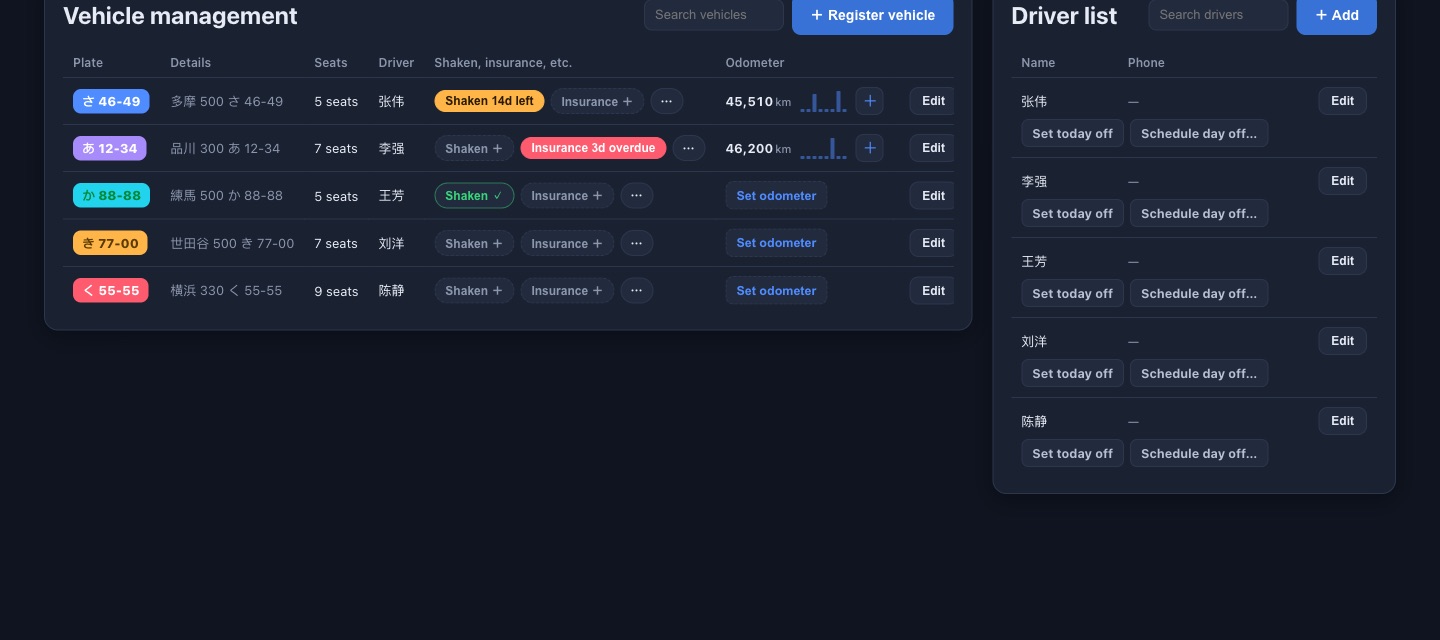
With HAICOIn “Vehicles · Drivers”, choose “Schedule day off…” in the driver list and pick the days. Any jobs left on those days are flagged together, and you hand each to another driver with a tap on a name.
A vehicle is in the shop, and a job gets booked on it anyway
The car is at the garage, but on the sheet it looks free, so it gets booked.
With HAICOSet the vehicle’s “Vehicle status” to “In repair”. Vehicles in repair can’t take new orders or have orders moved onto them, and any existing jobs are flagged so you can move them to other vehicles in one go.
Some customers pay in yen, others in yuan, and month end is a mess
Splitting the totals by currency by hand is slow and easy to get wrong.
With HAICOPick a currency for each order (admins can add more currencies). “Revenue” totals each currency separately and never converts them, so nothing gets mixed up.
Green-plate Shaken inspections and insurance renewals sneak up on you
Commercial green-plate vehicles need a Shaken (vehicle inspection) every year, and insurance and maintenance dates differ by vehicle.
With HAICOEnter Shaken, insurance and maintenance due dates, and admins get reminders from 30 days out (by default) in the notification bell and on HomePro.
The accountant wants all the orders in one file
At month end you copy bookings from the dispatch sheet into another sheet for the books.
With HAICOAdmins press “Export CSV” in “Orders” to export a month of orders. It opens straight in ExcelPro.
HAICO isn’t a ride-hailing app. Passengers don’t use it to call a car to where they are. It’s a dispatch tool that operators use to organize bookings, vehicles, drivers and schedules.
Common questions
- Can independent operators use it?
- Yes. Independent taxis, small transfer businesses and other small operators can start for free. The free plan covers up to 6 vehicles and 10 drivers.
- Does it work for green-plate taxis, charters and airport transfers in Japan?
- Yes. Operators of green-plate taxis, charters, airport transfers (pickups and drop-offs) and private hire in Japan manage bookings, vehicles and drivers in HAICO.
- Can passengers book a taxi through it?
- No. HAICO is a dispatch tool for operators, not a ride-hailing app where passengers request a car to their location.
- Can I switch over from an Excel dispatch sheet?
- Yes. Add your vehicles and drivers, then manage upcoming orders in HAICO. See moving from an Excel dispatch sheet to HAICO for the steps.
Bookings and vehicle schedules, on one dispatch board.
Try HAICO free